

Convertire audio file 3ga to mp3 o ogg
Ci sono occasioni in cui può essere comodo  convertire audio 3ga in mp3 (3ga to mp3).
Ad esempio vi mai capitato di registrare qualcosa con il registratore di Android? Magari una lezione di università, un'intervista, un corso, … le occasioni sono tantissime. Il problema è che il registratore di Android salva il file nel formato 3ga (che poi è la parte audio dei file video 3gp) e questo formato audio spesso non è gestito da molti player o da applicazioni per l'editing audio.
Se per qualsiasi motivo si ha la necessità di editarlo per fare il merge con altri file audio per pulirlo dal rumore di fondo o aumentarne il volume con qualche software tipo Audacity è d'obbligo convertirlo nei più classici formati MP3 o OGG.
Per farlo, su Linux, è possibile utilizzare il comodissimo Sound Converter presente nei repository delle principali distribuzioni.
L'utilizzo è semplicissimo, si apre il file 3GA da convertire come da figura sotto

quindi si preme sul pulsante CONVERTI in alto a sinistra.
Di default viene convertito in un file Ogg Vorbis. Se si vuole convertire in un formato diverso è sufficiente specificarlo nelle preferenze (Modifca → Preferenze) scegliendo tra i seguenti possibili formati: MP3, FLAC Lossless, MS Wave (wav) e AAC (m4a).
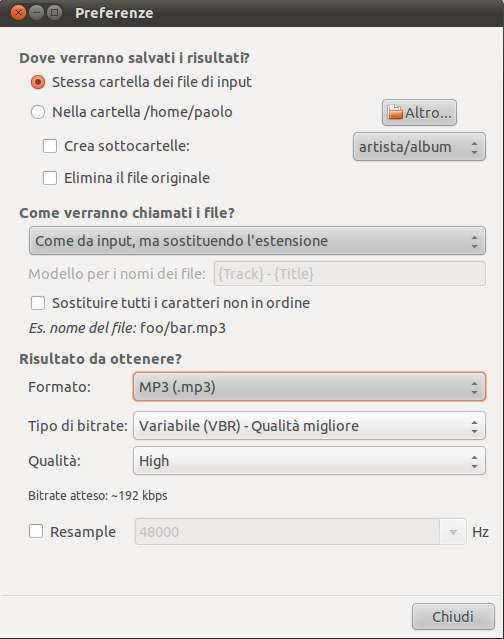
Ora avete il vostro audio file nel formato che preferite e potete elaborarlo come volete.
AGGIORNAMENTO:
convertire 3ga in MP3 direttamente da Android).
Potrebbero interessarti anche i seguenti articoli:

 by
by 
ok ma sei io volessi per esempio convertirlo direttamente dal mio galaxy note per poter spedirlo con whatsapp viste che quando lo invio ad un amico cn questo programma poi lui non riesce a sentirlo? Aiutoooooooo
Ciao marco,
faccio la conversione su PC con Linux perchè è più comodo per registrazioni lunghe vista la potenza di elaborzione dei PC.
Però è possibile convertire i file 3ga in mp3 anche da Android tramite qualche app.
Un’app che fa al caso tuo potrebbe essere: MP3 Media Converter. Cito testualmente:
…Media converter allows you to convert your media (videos of flv, 3gp, mp4 and more…) files to mp4 or mp3 ….
Fai attenzione solo ad una cosa, non vede i file 3ga generati dal registratore di Andoid, però vede i file 3gp che sono la stessa cosa. Ti basta rinominare il file della registrazione modificando l’estensione da 3ga a 3gp ed a quel punto viene visto da MP3 Media Converter. Lo puoi fare tranquillamente con un qualunque file manager. I files generati dal registratore di Android vengono salvati in /sdcard/Sound.
Spero di esserti stato di aiuto. Ciao
Ciao, ho installato sound converter. La schermata iniziale è uguale alla foto che hai messo su, ma non riesco a trovare il modo di entrare nelle Preferenze per cambiare da ogg a mp3. Come devo fare? help
dal menu principale: Edit -> Preferenze
…se usi Ubuntu il menu lo trovi sulla barra in alto del desktop
ciao
Grazie tanto…per me era invisibile. Mi concentravo solo sulla schermata piccola. Andrea.
…this is Unity time 😉
con Uniti, i menu dell’applicazione attiva, vengono spostati nella barra in alto, come sul MAC. Ho faticato anch’io ad abituarmi ma ora lo trovo veramente comodo.
Convert audio file 3ga to mp3 or ogg Linux, Open Source e … altro: bel post su argomento da non sottovalutare. Marcus
Muchas gracias por tu entrada.
Enhorabuena por utilizar GNU-Linux y software libre.
Un saludo
Santi
If you want to play 3GA successfully every time and on every device the best solution is to convert 3GA to MP3, WAV, WMA, FLAC, AAC, AC3, M4A, etc,You may try use Avdshare Auido Converter.
I use iDealshare VideoGo to batch convert samsung voice recording 3ga files to mp3
According to my test, it also helps to convert 3ga to wav, m4a, aac, aiff, etc